
Why context management matters
In a plain CLI session, everything a turn does stays in the context for the rest of the conversation: every file it read, every build log, every search result. Long sessions fill the context window with output the model no longer needs, and every request carries all of it. When the window is full, auto-compact summarizes the whole conversation at once, on its own schedule.
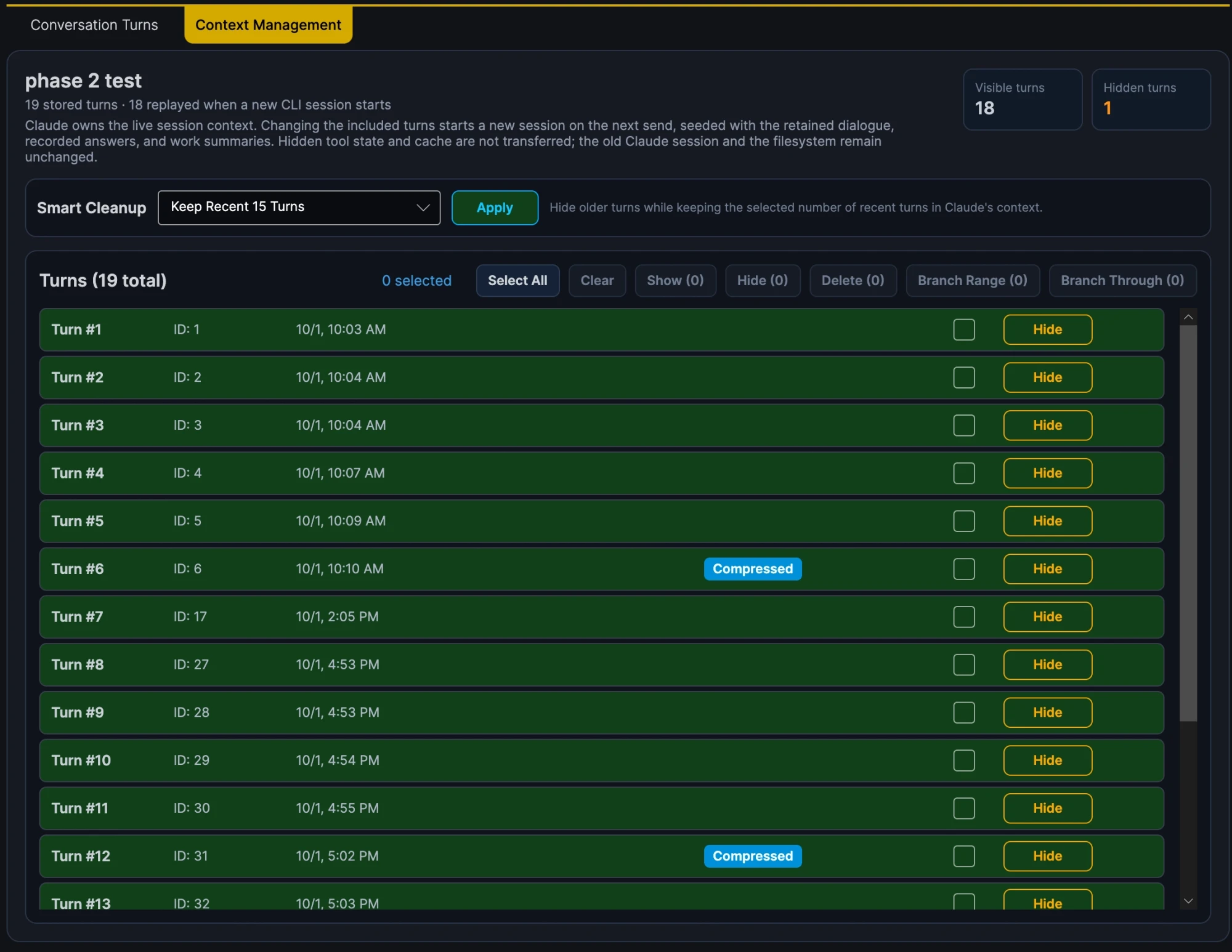
SharpTurns turns auto-compact off and lets you decide what the model sees, one turn at a time. Any change starts the next turn in a fresh CLI session, seeded from the trimmed history that SharpTurns keeps in its database.
Compressing a turn
A compressed turn is replayed as three parts:
- Your input, word for word: the prompt, messages you sent during the turn, and your answers to the model's questions.
- A work summary of the tool calls, their output, and the intermediate steps: what was done and decided.
- The final response, word for word.
Only the work effort is condensed. The two most important parts of every turn, what you asked and what the model concluded, are never summarized.
A compression has to earn its place. It is kept only if it makes the replay smaller than the turn's saved content, and each compressed turn shows how much smaller its replay became, for example "2.9x replay reduction".
Summaries come from a separate, tool-less claude -p call with the summarizer model and effort you choose. A turn with no tool calls gets a fixed summary without a call. Auto-Summarize, on by default for new conversations, compresses each turn as soon as it finishes; stopped and failed turns are left alone.
Nothing is thrown away. The full turn stays in the database, View Full Turn Content shows it, and Expand discards the summary and puts the full turn back in the replay.
Hide, images, and branches
- Hide a dead end, or a turn that no longer matters, and it leaves the replay entirely. Show puts it back.
- Choose which images keep being replayed. A full turn sends all its images, a compressed turn sends only the ones you chose (the rest as short text descriptions), and a hidden turn sends none.
- Branch a contiguous run of turns into a new conversation, with their hidden and compressed state. The source conversation is unchanged.
- Bulk actions in the Context Management tab clean up or delete many turns at once. They only touch turns you can see.
Less noise, more signal
Once a turn is done, most of its raw tool output is noise: whole files read for one function, pages of build and test logs, searches that found nothing, attempts that were abandoned. Left in the context, all of that bloat stresses the model's attention. Every token competes with the ones that matter.
Auto-Summarize removes the noise without touching the signal. Every later turn starts from a distilled history instead of the raw transcript, so the context holds a much higher share of useful information, and the gain grows with every turn.
A fresh session, not a cold cache
Starting a fresh CLI session after every change could mean paying full price for the history each time. A lot of work went into keeping the reseeded history eligible for the API's input token cache:
- The history is replayed the same way every time, so earlier turns stay unchanged from one request to the next, and a single cache marker with a 1-hour lifetime sits at the end of the history.
- The CLI's Git status snapshot, which changes with the repository and would invalidate the cached history after it, is turned off.
- The CLI's experimental betas are turned off, because they use all four of the API's cache markers and leave none for the history.
So when you compress the latest turn, the next turn can read every earlier turn from the cache. Only the changed turn and the new request are sent uncached. Hiding or compressing an older turn changes the history from that turn on, so that part is cached again. Each turn card's First-Request Cache Hits shows how much of the turn's opening request came from the cache.
One conversation instead of a crowd of subagents
Subagents exist mainly to protect a context window that never shrinks: each one reads and searches in a context of its own and hands back only a summary, so the main conversation doesn't fill up. That protection is expensive.
Anthropic found that its multi-agent research system used about 15 times the tokens of a chat, against about 4 times for a single agent, and that most coding tasks split into far fewer truly parallel pieces than research does. Each subagent starts cold and rereads the files it needs, parallel subagents can duplicate each other's work, and each acts on assumptions the others never see. Cognition argues that these conflicting decisions are what make multi-agent results unreliable, and the main conversation is left to reconcile them.
With every finished turn condensed, the main conversation doesn't need that protection. One model keeps the whole thread of decisions and can take on far more work before its context fills up. SharpTurns blocks the CLI's subagent tools, so all of the work happens in the one conversation you can see and manage. Each turn still has to fit in the context window on its own, so split very large jobs across several turns.
How it uses the CLI
SharpTurns has no model provider, API client, or tool runtime of its own. Each turn runs your installed, unmodified claude binary as claude -p with stream-json input and output, and the CLI runs its own tools under its own sign-in. SharpTurns never reads or stores your Claude credentials.
- Your CLI setup still applies. The CLI discovers the project's
CLAUDE.md(orAGENTS.md) and loads your settings files. SharpTurns overrides them to turn off hooks, auto-compact, and the fallback model. - Coding tools are preapproved, and you choose the exceptions. Tool calls matching the ask rules in Config → Preferences open an Allow/Deny dialog before they run. The rules use Claude Code's permission syntax and cover
git commitandgit pushby default. Ask rules in your Claude Code settings files and the CLI's own safety checks still apply too. - MCP servers run only where you select them, per conversation. Your own CLI MCP configuration isn't used.
- Sessions resume when they can. After a clean turn with unchanged history, the next turn resumes the CLI session. Otherwise it reseeds a fresh one from the saved conversation.
The repository's design notes explain the reasons behind each of these choices.